Tea App checker for men: find out if you’re on the Tea App
A real person searches by hand · Answered in hours, not days · 100% confidential
- Men can’t get in. The Tea App is women-only, and every member is checked.
- Google won’t show it. Posts sit behind a sign-in.
- We search by name, photo and city, post by post.
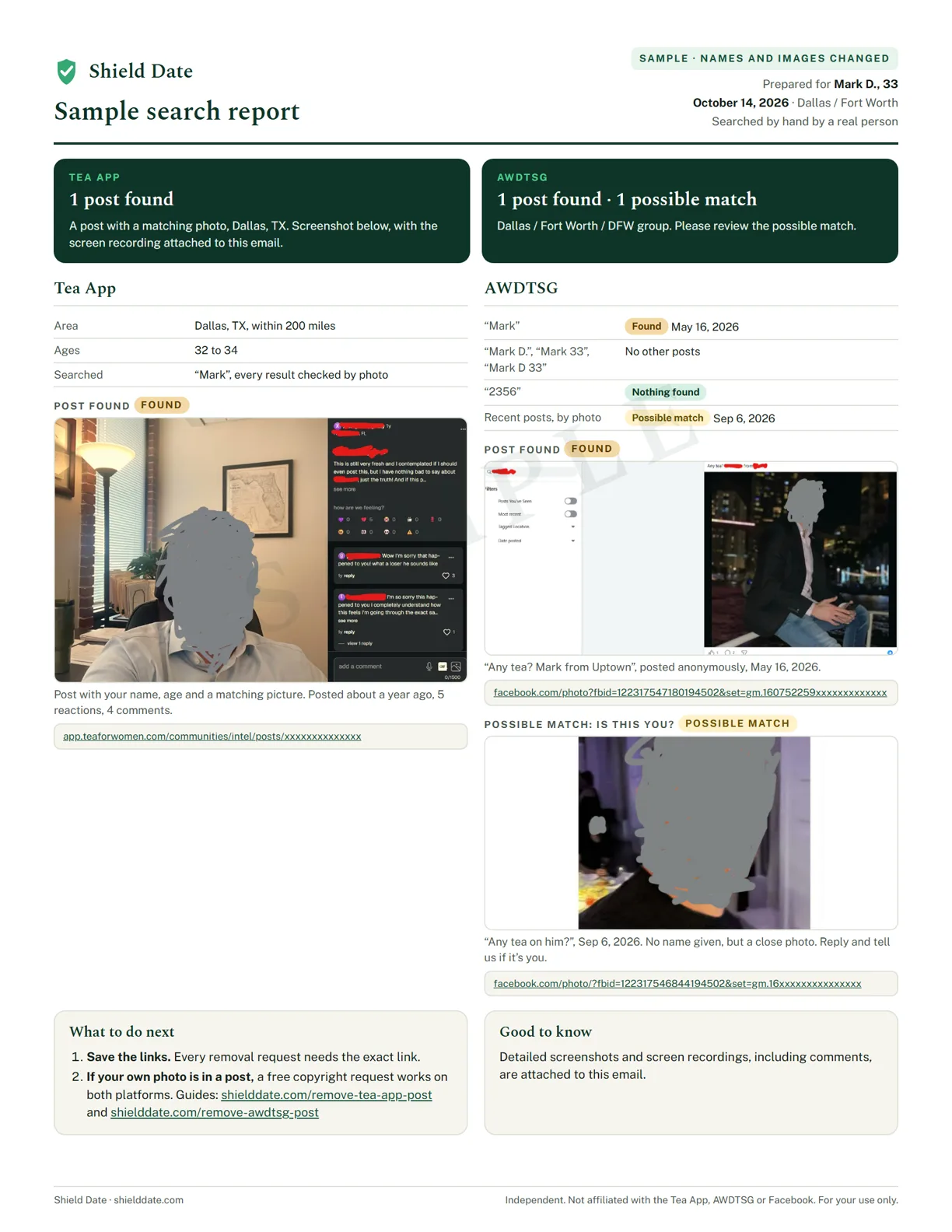
- You get screenshots and proof of where we looked, posted or not.
- Your AWDTSG groups are included, at no extra cost.
Why you can’t just look yourself
The Tea App checks that every member is a woman before she can read a single post. There’s no guest view and no men’s login, and the posts never show up in Google.
That’s why most men only find out from a friend, a screenshot, or a date that suddenly goes cold. By then the post has been read for weeks.
How our search works
-
Tell us who to look for
Your name, age, city and a photo, if you have one. It takes about 2 minutes.
-
A person searches the Tea App
By name and by photo, post by post. No scripts and no shortcuts.
-
We search your AWDTSG groups too
Posts often show up in both places, so every search covers both.
-
You get a clear answer
Screenshots, links and proof of where we looked. Answered in hours, not days.
What a Tea App search covers
Names repeat. There are hundreds of men called Mike or Chris in any big city, so a search by name alone isn’t enough. We search the Tea App every way a post can point to you:
- By name and nickname. Posts usually show a first name, so we search yours and the versions people actually use.
- By age. Most posts list an age, which narrows a common name down fast.
- By phone number. Some posts include part of a number, often the last 4 digits. If you share yours, we search it too.
- By photo. Every result is checked against your picture, so a post about a different man with your name isn’t counted as you.
- By area. The Tea App shows posts by city and distance, so we search the area where you live and date, not just one town.
The more you tell us, the more thorough the search: a nickname, the dating apps you use, or a second city you’ve dated in all help.
What you get
| Posted | Screenshots of every post, the direct links, and a step-by-step removal guide. |
| Not posted | A documented “nothing found”, with proof of every place we searched. |
| Either way | 100% confidential. Nobody on the Tea App is told you asked. |
Is a Tea App checker legit?
Some are, many aren’t. The Tea App is women-only and behind a sign-in, so no tool can search it automatically. Before you pay anyone, check for these red flags:
- Results in seconds, or “AI scanning”. A real search takes a person, and time.
- It never asks your city or age. The Tea App shows posts by area, so a real search needs both.
- It asks for your passwords or logins. No real search needs them.
- No proof of where it looked. A “you’re clean” with nothing to show is just a guess.
- A monthly fee that’s hard to cancel, or a free trial that quietly turns into one.
A real search is done by a person, tells you how long it takes, and shows you where it looked. That’s how every Shield Date search works. For the full list of warning signs, see how to spot a fake Tea App search.
What men say after their search
Real messages from men we searched for. Names are hidden.












Common questions about Tea App checkers
Some are, many aren’t. A legit search is done by a person, asks your city and age, and shows you where it looked. Instant results, AI scanning or a request for your passwords are red flags.
Not a reliable one. No free tool can search the Tea App, because it’s women-only. The free option is asking a woman you trust to look for you.
No. The Tea App is women-only and checks every member before she can read posts. There is no guest view, and posts don’t show up in Google.
You can’t check yourself. A woman you trust can look for you, or a service can search the Tea App by hand and show you proof of where it looked.
Yes. Your details are used only to carry out your search and are never shared. Nobody on the Tea App is told that you asked.
Answered in hours, not days. You get a report with screenshots and proof of where we looked, whether or not anything was found.
You get screenshots, the direct link and our free Tea App removal guide. If your own photo is in the post, a copyright request through the Tea App’s own form is usually the fastest way to get it taken down.
Find out if you’re on the Tea App
A real person searches the Tea App and your AWDTSG groups by hand, and sends you screenshots, the links, and proof of where we looked. Answered in hours, not days.
Start your private search →Shield Date is an independent service and is not affiliated with the Tea App, AWDTSG or Facebook. Every search is done by hand by a real person.